


FM07
7" Vehicle Mounted Computer with M12 connector
KEY FEATURES
- Intel® Celeron® N3350 Apollo Lake Vehicle Mounted Computer
- 7” 1024 x 600 panel with projected capacitive Multi-Touch screen
- Wide power input 9-36V DC with ignition
- M12 waterproof connectors
- IP65 waterproof and dustproof
- Shock and vibration resistance according to MIL-STD-810G

MIL-STD 810G" title="MIL-STD 810G 
IP65" title="IP65 
E-Mark" title="E-Mark 
FCC" title="FCC 
CE" title="CE
CERTIFICATIONS
FM07
7" Vehicle Mounted Computer with M12 connector


Product Details

Easy In-Vehicle Installation
Winmate FM07 series supports VESA and RAM mounts to help you save time and ease installing the vehicle-mounted computer. The FM07 is easily mounted and fully rugged, helping you to have higher work efficiency.
For more mounting information, please visit RAM Mount, VESA Mount

Vehicle Power Solution
Wide power input with the ignition control feature detects the ignition signal status and allows users to control the on or off delay time setting through the customized software utility. Power input voltage varies by model.

Programmable Function Keys
Save time on finding your favored application on the screen using 5 programmable function keys. Customize the function for your unique application.

Wireless Connectivity
The FM07 series vehicle-mounted computer features wireless connectivity WLAN, BT, and GPS to help you stay connected no matter where a task brings you. Add an optional WWAN feature for your in-vehicle IoT application.

Built to Survive
The FM07 is a fixed mount computer built to survive the rigors of the road. Vibration and shock-resistant, the FM07 series is compliant with the MIL-STD-810G standard, IP65 water and dustproof. Winmate’s FM07 Series is built to survive extreme weather, operates through temperature changes from -20°C to 60°C, and is suitable for cold storage applications.
Specification
Touch / Glass
Projected Capacitive Multi Touch Screen
Size
7.0 inches
Resolution
1024x0600
Panel Brightness
1000.0 nits
Contrast Ratio
800:1
View Angles
85,85,85,85
Active Area
152.2144x85.92 mm
Processor
Intel Celeron N3350 1.1GHz (up to 2.4GHz) (Default)
Intel Pentium N4200 1.1GHz (up to 2.5GHz) (Optional)
Memory
4GB (Default)
8GB (Optional)
Storage
1 x M.2 2242 SSD 128GB
Ethernet controller
1 x Intel® Ethernet Controller
Security
TPM 2.0
Operating System
Windows 10 IoT Enterprise (64 bit) (Default)
Linux Ubuntu 20.04 (Optional)
WLAN
Support
BT
Support
WWAN
4G/LTE (Optional)
GNSS
GPS, GLONASS
Operating Humidity
10% to 95% RH
Operating Temperature
-20°C~60°C
Storage Temperature
-20°C~60°C
Shock
MIL-STD-810G Method 516.6 Procedure I
Vibration
MIL-STD-810G Method 514.6 Procedure I
IP rating
IP65, Dustproof and Waterproof
Certification
CE, FCC
E-mark
USB Port
2 x USB for DB9
Serial Port
1 x RS232/422/485 (Default RS232)
LAN
1 x Gigabit Ethernet LAN 10/100/1000 Mbps (M12 type)
Audio
1x Speaker
SIM Card Slot
1 x SIM Card Slot
Front Control
5 x Function Key
Indicator
Power, HD
DIDO
DIDO (5XDI ; 3XDO)
CANBUS
2 x CANBUS
Button
1 x Power Button, 5x Function Button
(Programmable Function Key Configured by Winset)
Dimension
190 x 146 x 40 mm
Weight
1.25 kg
Mounting
RAM mount
Cooling System
Fanless Design
Accessory
User Guide
M12 LAN Cable, 1.8m
RS-232 Cable, 1.8m
M12 Power Cable, 1.8m
USB Cable, 0.3m
CANBus and DIDO Cable, 1.8m
WLAN Antenna
Power Converter Cable
Power Adapter
Optional Accessory
WWAN Antenna x 2 (Optional)
Audio Cable, 0.3m (Optional)
GPS Antenna, 3m (Optional)
Power Rating
9V-36V, with ignition control
Consumption
Max: 35W
Accessories
STANDARD ACCESSORIES
M12 Power Cable

Model Name: PC-FM07
Part Number: 94J004L040K1
- 1.8m M12 to power cable
Adapter

Model Name: EA10681G
Part Number: 922D050W12VA
- 1.8m, 100-240V AC to 12V 50W DC
M12 LAN Cable

Model Name: LN-FM07
Part Number: 94I0120080K0
- 1.8m M12 to RJ45 cable
USB cable

Model Name: USC
Part Number: 9483098080K0
- 0.3m D-Sub 9 USB connector on dock to two standard USB host connectors
Power Converter Cable

Model Name: PCC-FM
Part Number: 94J602G030K2
- Terminal block to adapter converter cable
Wi-Fi/BT Antenna

Model Name: WFA-FM07
Part Number: 397SM000000S
- One dual band Wi-Fi antenna
RS232 Cable

Model Name: RSC
Part Number: 94G4094090K1
- 1.8m standard 9-Pin male com port cable
CANBUS+DIDO Cable
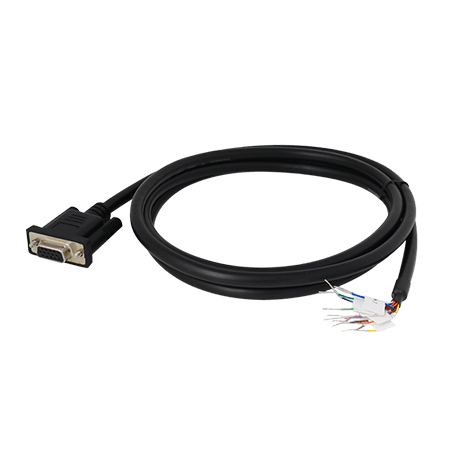
Model Name: CD-FM07
Part Number: 94E215L140K0
- 1.8m D-Sub 15 pin IP65 cable for CANBUS and DIDO
OPTIONAL ACCESSORIES
WWAN Antenna

Model Name: WWA-FOM07
Part Number: 397SM000000Q
- WWAN antenna for higher accuracy
GPS Antenna

Model Name: GSA-FM
Part Number: 397SM000000N
- 3M, GPS Antenna
Audio Cable

Model Name: AC-FM
Part Number: 94E215R060K0
- Dsub 15 pin to Audio out cable
How to Mount Your Vehicle Mounted Computer
Winmate recommends using RAM Mounting Parts as part of our device mounting solution. The below information is just a guideline on how you should mount the Winmate device using RAM Mount. To purchase the RAM parts, please follow the RAM Mounts Part Number and purchase from your preferred retailer.
Mounting 1 – No Drill Solution

| No. | Component | RAM Mount Part Number | Description | QTY |
|---|---|---|---|---|
| A | RAM Clamp Mounts - on the forklift | RAM-D-247U-4 | Clamp base with 2.25” Ball | 1 |
| B | RAM Arm | RAM-D-201U | Arm for 2.25” Ball(L: 8.375”) | 1 |
| C | RAM Ball on the device side | RAM-D-2461U | 75x75mm VESA with 2.25” Ball | 1 |
| C-1 | Screw | - | SUS304 M4 x 12mm Screw | 4 |
| C-2 | Washer | - | M4 Washer | 4 |
Mounting 2 - Drill Solution

| No. | Component | RAM Mount Part Number | Description | QTY |
|---|---|---|---|---|
| A1 | RAM round base mounts - on the forklift | RAM-D-202U | 3.68" Round Base with 2.25" Ball | 1 |
| A1-1 | Screw | - | SUS304 M8 x 40mm Screw | 4 |
| B | RAM Arm | RAM-D-201U | Arm for 2.25” Ball(L: 8.375”) | 1 |
| C | RAM Ball on the device side | RAM-D-2461U | 75x75mm VESA with 2.25” Ball | 1 |
| C-1 | Screw | - | SUS304 M4 x 12mm Screw | 4 |
| C-2 | Washer | - | M4 Washer | 4 |
Mounting 3 - Keyboard Mounting Installation

| No. | Component | RAM Mount Part Number | Description | QTY |
|---|---|---|---|---|
| A | Winmate Keyboard Adapter Plate (designed by Winmate, PN:821009131600) | - | 4 VESA Holes on the plate to device and 4 AMPS holes to RAM Ball | 1 |
| A-1 | Screw | - | SUS304 M4 x 10mm Screw | 4 |
| A-2 | Washer | - | M4 WASHER | 4 |
| B | RAM Ball on the sloped part of the keyboard adapter plate | RAM-D-202U | 2.5" Round Base with 1.5" Ball | 1 |
| B-1 | Screw | - | SUS304 M5 x 16 mm Screw | 4 |
| B-2 | Washer | - | M5 Washer | 4 |
| C | RAM Ball on the bottom part of the keyboard adapter plate | RAM-D-202U | 2.5" Round Base with 1.5” Ball | 1 |
| C-1 | Screw | - | SUS304 M5 x 12 mm Screw | 4 |
| C-2 | Washer | - | M5 Washer | 4 |
| D | RAM Arm | RAM-D-201U | Arm for 1.5" Ball (Length:5.6") | 1 |
| E | RAM Ball on the sloped part of the keyboard adapter plate | RAM-D-202U | 2.5” Round Base with 1.5” Ball | 1 |
| E-1 | Screw | - | SUS304 M5 x 12 mm Screw | 4 |
| E-2 | Washer | - | M5 Washer | 4 |
| F | Keyboard | - | - | 1 |
VESA Mount Installation
The rear cover of the FM07 supports VESA mount (75 x 75 mm).
Winmate does not supply VESA Mount parts.
- Attach the VESA Plate to the rear cover of the FM07 using 4 x M4 mm Phillips screws
- Follow instructions provided by VESA mount parts supplier.

✓Note:
- In this example we use the FM07 series vehicle mounted computer as an example. Available installation methods may vary depending on your purchased model.
- Some pictures in this guide are samples and can differ from actual product.
Product FAQs
Does Winmate offer white-label or OEM branding for the FM07?
Yes, Winmate provides comprehensive OEM branding services. We allow fleet customers to replace the standard Winmate logo with their own corporate identity on the front bezel, packaging, and user manuals. This "White Label" service enables you to present the device as your own proprietary solution to end-users.
Can Winmate customize the Android OS to remove bloatware?
Yes, we offer deep Android ODM customization. Our engineering team can create a custom Android OS image for your project. This includes adding your company’s custom boot logo, pre-installing your business applications, and removing unnecessary Google apps or settings to ensure a secure, locked-down environment for drivers.
Can the FM07 mounting be modified for non-standard roll cages?
Yes, Winmate offers ODM mechanical design services. If standard VESA or RAM mounts do not fit your specific forklift or vehicle cabin, our mechanical engineers can design and manufacture custom mounting backplates or brackets to ensure a perfect fit for your fleet.
Can I customize the I/O connectors to prevent cable detachment?
Yes, the I/O interface is customizable via ODM service. For environments with heavy vibration, we can replace standard USB or DC jacks with ruggedized M12 aviation connectors or locking headers to ensure cables never disconnect during operation.
Does the FM07 support custom power logic for electric forklifts?
Yes, the ignition control logic is fully programmable. Winmate can customize the MCU firmware to adjust the "Power-on Delay" and "Shutdown Delay" timing, ensuring the device works perfectly with the specific voltage behaviors of your electric or diesel forklift fleet.
Is the FM07 rugged enough for extreme cold storage?
Yes, it is IP65 rated and MIL-STD-810H certified. For ODM projects requiring operation in extreme sub-zero freezers, we can integrate specialized internal heaters or apply conformal coating to the PCB to prevent condensation damage.
Does Winmate offer long-term availability for this model?
Yes, Winmate guarantees long-term product lifecycle support. For OEM contracts, we ensure component availability and strict revision control, ensuring that the units you buy three years from now will be identical to the ones you certify today.
Can I get a custom internal battery for longer backup?
Yes, battery capacity can be customized. While the standard internal battery provides ~20 minutes of backup, ODM clients can request modifications for larger capacity cells if the application requires extended uptime without vehicle power.
Can Winmate integrate a specific barcode scanner brand?
Yes, we offer hardware integration services. If your fleet standardizes on Zebra or Honeywell scanners, we can modify the FM07 housing to include a dedicated holder or a powered port specifically designed for your preferred peripheral.
Can the touchscreen sensitivity be tuned for specific gloves?
Yes, the PCAP touch firmware is customizable. We can provide a tuning tool or pre-configure the touch controller at the factory to recognize input from specific heavy-duty work gloves used by your workforce.


